ARRANCADA guide
ARRANCADA Beginner Guide: Your First 201m Run
Learn your first ARRANCADA 201m run: select a car, follow staging prompts, use driving controls and read saved results before upgrading.
Quick answer
Use Vehicles to select your available car, learn throttle and steering, line up at a drag lane and follow the staging lights.
Complete your first 201m run
Read the current game values before confirming purchases or changing a setup.
1. Find your car and learn the driving display
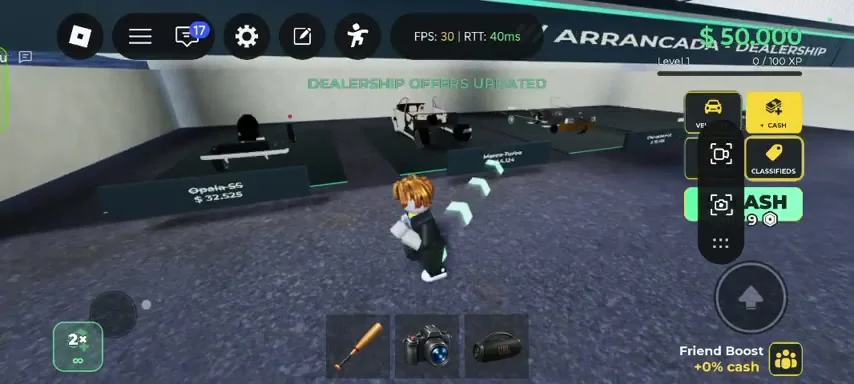
The reviewed mobile recording shows a Vehicles button and a dealership with cars displayed at individual stands. Use the current vehicle menu to select a car you already own before considering another purchase.
- Success check
- Your selected car is visible and the speed and gear displays respond while driving.
- If it remains unclear
- Once seated, check the large speed display and gear indicator. The recorded driving view has separate throttle, brake, steering and shift controls. Practice moving and stopping in a clear area before joining a lane.
2. Approach a lane and follow the staging prompt
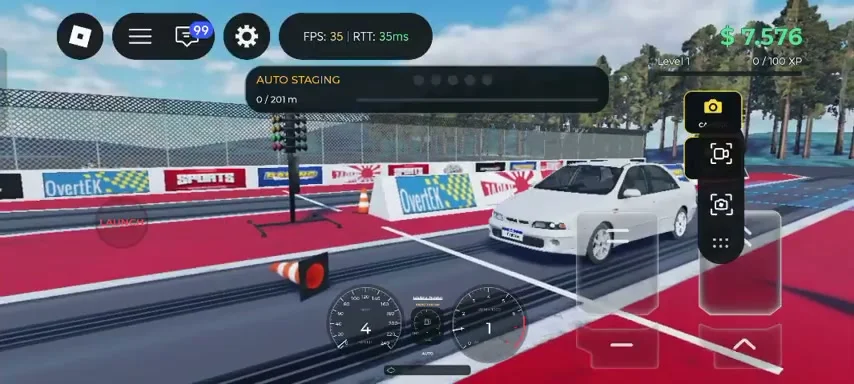
Drive toward the red-bordered drag strip and align the car with the lane. The recorded build displays AUTO STAGING or Portuguese preparation prompts above a 0 / 201m progress indicator.
- Success check
- The staging prompt appears and distance is at the start of the 201m lane.
- If it remains unclear
- Let the current prompt guide the final alignment. If the lane shows a queue reservation, wait for the running race to finish. Reversing or entering from the wrong angle can leave the car outside the expected start position.
3. Complete the pass and check the result
Follow the start lights, keep the car straight and use the current transmission controls. The distance progress advances toward 201m and the run result can appear as a timing slip.
- Success check
- A completed pass appears in Runs with a timing result.
- If it remains unclear
- Brake and move clear after the finish. Open Runs to review the saved pass. A single fast attempt is a weak baseline; repeat several clean runs before deciding whether an upgrade helped.
4. Save cash for a deliberate workshop change
The official description confirms engine and turbo stages, gearbox tuning and multiple fuels. The workshop recording separates Performance and Visual tabs.
- Success check
- You can identify Performance and Visual before selecting a paid part.
- If it remains unclear
- Choose one goal for the next session. If your starting procedure is inconsistent, practice it first. If you are comparing upgrades, record the current car, stage, transmission mode and run time so the next result is meaningful.
Scope and sources
Official description and reviewed gameplay checked November 5, 2026.
- For ARRANCADA by Patricia07692, Universe 10769900349. Recorded interface observations can change after updates.